Dobot1-Control (v1.4.0)







Control a Dobot v1 arm (2016 model) with Python, based on the work (and requires the firmware) of open-dobot by maxosprojects. Now including motion planning, limits and flexible accelerometers support, tested with SCA1000 additionally.
This is a further development of the DobotSDK package. Tested and developed with the original FPGA hardware and the open-dobot firmware.
Installation
pip install dobot1-control
You can also install the in-development version with:
pip install git+https://github.com/ibressler/dobot1-control.git@main
Documentation
Usage
Motion planning
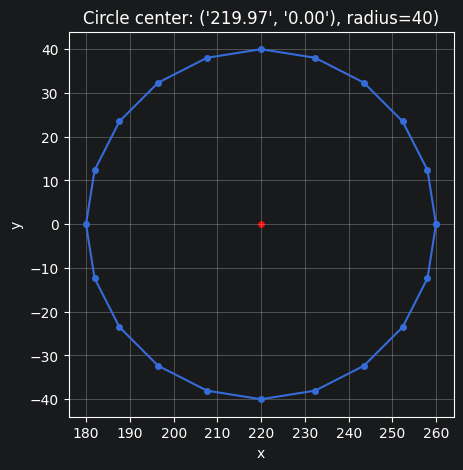
The arm should move through a series of points with the highest possible speed allowed by the given maximum velocity and acceleration, full stops on direction changes only. For a circular path like the one below, it should try to maintain a continuous motion.
This is what the actual motion looks like now, with the actual speed of each joint over time (steps taken per interval of 50 ms):
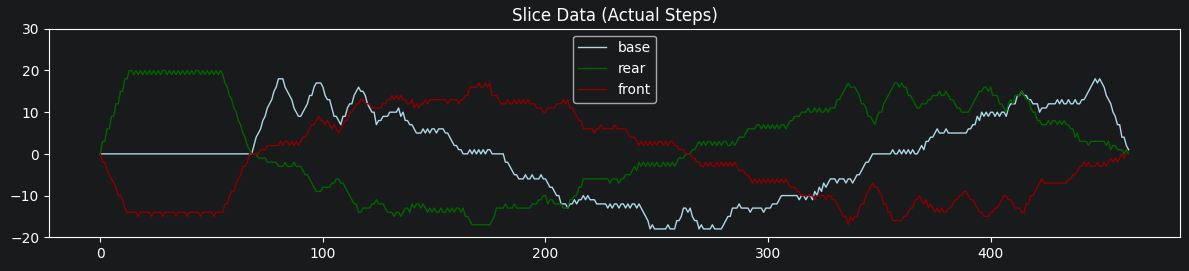
This example can be found in the dobot example moves.ipynb notebook.
Free Accelerometer Conversion
As it seems, the dobot arm was shipped with different accelerometer ICs at different production batches. The previously hardcoded conversion factors were not accurate for the SCA1000 accelerometers found in some Dobot v1 arms. Additionally, the sensor offsets need to be determined for each accelerometer anyway.
To move the arm tool as precisely as its mechanical capabilities allow along a straight line parallel to a flat surface, such as a table, calibrate the accelerometer offsets and conversion factor. The determined values need to be provided to the Dobot() constructor:
Dobot("/dev/ttyACM0",
      endEffectorOffset=(49., 64.),
      accelOffset=(1016.39, 1009.08),
      accelConversion=509.00)
Accelerometer Calibration
The scripts/calibrate-accelerometers.py tool helps in finding offsets and conversion factors for the installed accelerometers. Once the package was installed, the tool can be run as follows:
Usage
dobot-calibrate-accelerometers [mode] [options]
Modes
continuous(default): Continuously reports accelerometer data and calculated angles.positions: Calculates sensor offsets and conversion factors based on two measured positions.
Positions Mode Options
--pos1 X Y Z: First position for calibration (default:120 0 0).--pos2 X Y Z: Second position for calibration (default:320 0 0).--offset H V: End effector offset: horizontal and vertical distance of the mounted tool from joint 3 (default:51 15).
Follow the procedure below to enable the accelerometer reporting mode on FPGA. No action is required on the RAMPS as GY-521 accelerometers can be read at any time there.
Turn off power on the arm and disconnect USB cable
Connect USB cable
Enable the accelerometer reporting mode:
Press and hold the “Sensor Calibration” button on the FPGA version or ground pin D23 on AUX-4 on the RAMPS version
Press and release the “Reset” button
Start this tool (still holding the “Sensor Calibration” button on the FPGA version or keeping pin D23 grounded on the RAMPS)
Once the constructor ran (or the accelerometer data starts flowing on your console in continuous mode),
Release the “Sensor Calibration” button
Move the arm around to the positions prompted by the tool.
Finally, note the accelerometer offsets and conversion factor values reported on the console. Those are your accelerometers’ offsets to be supplied to the Dobot() constructor.
Disconnect USB cable again to reinit with the new values.
Development
Testing
This project uses pytest for testing and tox for running them in a reproducible environment.
See which tests are available (arguments after -- get passed to pytest which runs the tests):
tox -e py -- --co
Run a specific test only:
tox -e py -- -k <test_name from listing before>
Run all tests with:
tox -e py
Package Version
Get the next version number and how the GIT history would be interpreted for that:
pip install python-semantic-release
semantic-release -v version --print
This prints its interpretation of the commits in detail. Make sure to supply the --print
argument to not raise the version number which is done automatically by the release job
of the GitHub Action Workflows.
Project template
Update the project configuration from the copier template and make sure the required packages are installed:
pip install copier jinja2-time
copier update --trust --skip-answered
Copyright
Copyright © 2016 maxosprojects (original).
Copyright © 2026 Ingo Breßler (fork).
Licensed under the MIT License — see LICENSE.